How to Build AI SEO GPTs: 3 Examples from the GPT Store

Most SEO tools try to do everything. They end up doing nothing well. Building your own custom GPT takes 20 minutes, costs $0 beyond your ChatGPT Plus subscription, and produces better results than tools charging $100+/month — because it's built for your exact workflow.
Why Build Your Own SEO GPT
There are hundreds of AI-powered SEO tools on the market. I've curated a few hundred of them on this site. After testing dozens, I keep coming back to three reasons why custom GPTs win.
Reason 1: Purpose-Built Means Better Output
When you prompt ChatGPT with no context, you get generic output. Generic output creates two problems:
- AI hallucination — The model fills gaps with plausible-sounding nonsense. A custom GPT with your own data, brand guidelines, and rules hallucinates far less.
- Duplicate content risk — A competitor submits a similar prompt and gets nearly identical output. You unknowingly publish the same content. Here's more on avoiding plagiarism on generative AI content.
A custom GPT pre-loaded with your brand voice, keyword targets, and content guidelines produces output that's unique to you from the first message.
Example: I built a GPT for blog writing that includes my past articles as reference files, my target keywords spreadsheet, and instructions like "Never use passive voice. Keep sentences under 20 words. Always include specific dollar amounts and tool names." Every article it drafts already sounds like me.
Reason 2: Backlink From OpenAI
OpenAI.com has a Domain Rating of 92. When you publish a GPT to the store, your builder profile includes a verified website link.
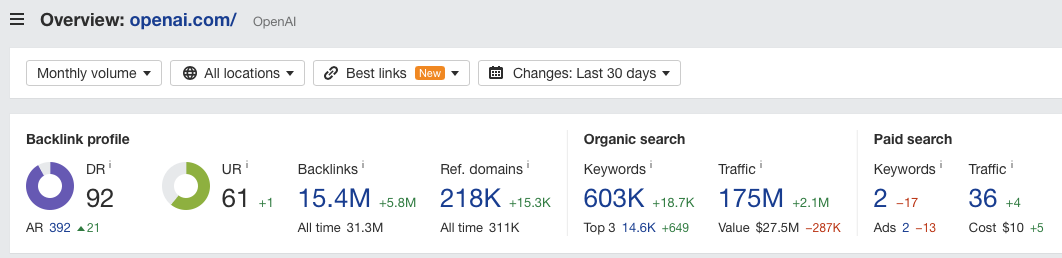
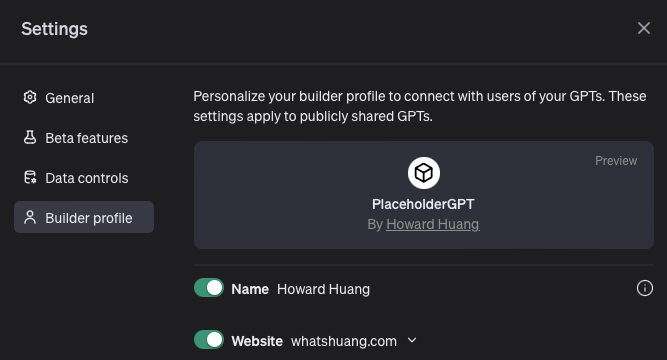
It's a nofollow link, so it won't directly pass PageRank. But nofollow links from DR 90+ domains still send positive signals. Google's own documentation says nofollow is a "hint," not a directive. And the referral traffic from GPT Store users discovering your profile is real.
Reason 3: Revenue Potential
OpenAI announced a revenue sharing model for GPT builders.
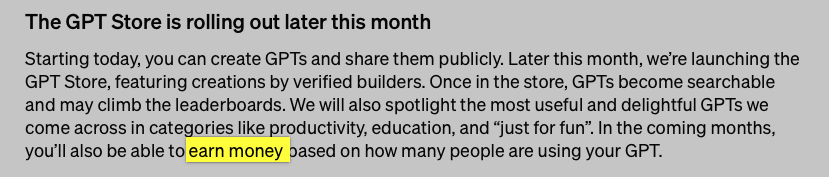
2025 reality check: The GPT Store revenue program has been slower to roll out than expected. Payouts are modest—most builders report $50-500/month for popular GPTs. The real money is using GPTs as lead magnets. Build a free public GPT that solves a specific problem. Include your website link. Drive traffic to your paid products or services.
How to Build a GPT (Step by Step)
Prerequisite: You need a ChatGPT Plus account ($20/month).
Step 1: Open the GPT Editor
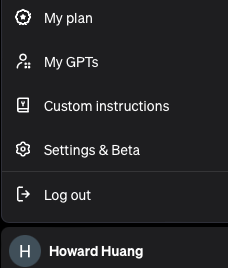
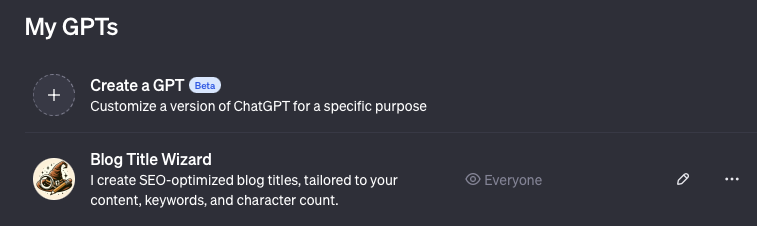
Click your name in the bottom left of ChatGPT, then click "My GPTs." Or go directly to the GPT editor.
Step 2: Create a New GPT
Click "Create a GPT" on the editor page.
Step 3: Configure via Conversation or Manual Setup
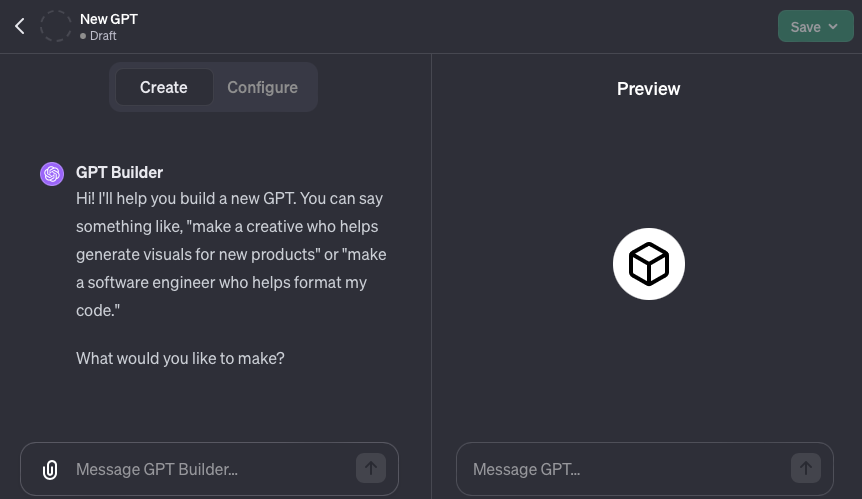
The "Create" tab lets you build by chatting naturally. The "Configure" tab gives you direct control over:
- Name and description — Make these keyword-rich. GPT Store has its own search algorithm.
- Instructions — This is your system prompt. Be specific. Include rules, tone guidelines, output format requirements, and constraints.
- Knowledge files — Upload PDFs, CSVs, or text files. This is where custom GPTs crush generic prompting. Upload your keyword research, brand guide, competitor analysis, or any proprietary data.
- Capabilities — Enable web browsing, DALL-E image generation, or code interpreter as needed.
- Actions — Connect external APIs. Pull live data from Ahrefs, Google Search Console, or your CMS.
Step 4: Test and Iterate
Use the preview panel to test prompts. Refine your instructions based on output quality. Common fixes:
- Output too generic? Add more specific examples in the instructions.
- Output too long? Add "Keep responses under 300 words unless asked for more."
- Wrong tone? Paste 3-4 paragraphs of your writing and say "Match this exact style."
For more prompting strategies, see best practices for ChatGPT prompts.
Step 5: Publish
Choose visibility: Only me (private), Anyone with a link (unlisted), or Everyone (public GPT Store listing). Public GPTs get discovered through GPT Store search and can earn revenue.
Three SEO GPT Examples I Built
Use these as blueprints. Each one took under 30 minutes to build.
Example 1: Blog Title Wizard
Problem: Writing SEO-optimized blog titles is harder than writing the article. You're juggling 6 constraints simultaneously:
- Under 60 characters
- Primary keyword near the front
- Strong click-through appeal
- Differentiated from competing titles in SERPs
- Accurate representation of content
- Numbers, brackets, or power words for attention
How I built it: The instructions include my title rules, 20 examples of titles I like (with explanations of why they work), and a required output format: 10 title options per request, each with character count and a 1-sentence rationale.
Usage: I paste my article outline or target keyword. It generates 10 titles. I pick the best one or ask it to iterate on my favorite.
Example 2: SEO Link Building Assistant
Problem: The hardest part of link building isn't the outreach. It's knowing where to start. Which sites should I target? What angle should I pitch? What content do I offer?
How I built it: The instructions define link building strategies:
- Digital PR
- Broken link building
- Guest posting
- Resource page outreach
- HARO
I uploaded a CSV of high-DR sites in my niche that accept guest posts. The GPT analyzes my site, identifies linkable assets, and suggests specific outreach targets with pitch angles.
Usage: I describe my site and a piece of content I want to build links for. It returns a prioritized list of outreach opportunities with draft pitch emails.
Future upgrade: I'm exploring connecting it to Ahrefs' API via GPT Actions to pull live DR data and backlink profiles in real time.
Example 3: Koality Convert
Problem: Most website owners know their conversion rate is bad but can't identify why. Hiring a CRO consultant costs $200-500/hour.
How I built it: The instructions include conversion rate optimization principles from CXL, Baymard Institute research, and 50+ common UX/CRO issues to check. It accepts screenshot uploads and analyzes them against these criteria.
Usage: Upload a screenshot of any webpage. The GPT identifies specific conversion issues (weak CTA placement, missing social proof, confusing navigation) and suggests fixes with examples. You can then chat with it to diagnose deeper problems.
Beyond the GPT Store: Custom GPTs for Teams
The GPT Store is the public-facing use case. But the biggest productivity gains come from internal GPTs your team uses daily:
- Content brief generator — Upload your keyword research. It produces detailed content briefs with target keywords, required headings, competitor gaps, and word count targets.
- Meta tag writer — Paste a URL or article draft. It generates an optimized title tag, meta description, and OG tags.
- Schema markup generator — Describe your page type. It outputs valid JSON-LD schema you can paste directly into your HTML.
- Content auditor — Upload a blog post. It scores readability, keyword usage, internal linking, and content depth against your standards.
Each one takes 15-30 minutes to build and saves hours per week. If you want to see how these GPTs fit into a broader AI SEO workflow, that guide covers the full process.
In Conclusion
If off-the-shelf SEO tools aren't serving your needs, build your own GPT. No coding required. Upload your data, define your rules, and publish. Start with one GPT that solves your biggest recurring SEO task. Once you see the time savings, you'll build more.
Related articles: How I Use AI SEO to Get on Page 1 · Best Practices for ChatGPT Prompts · How to Avoid Spam Detection on AI Content
Author

Want more like this?
I write about AI implementation, automation, and growth marketing. No hype.